Issue Type: Feature Request
It would be nice to see variations of functions documented like below code, when typing the function. I documented overloaded function according to this link jsdoc/jsdoc#1017 .
/**
 * Returns imported styles in 'dir/dir/style.scss' format.
 * @returns {string[]} Imported style's paths.
 *//**
* Returns imported styles in 'dir/dir/style.scss' format.
* @param {string} content File content to be used in operation.
* @returns {string[]} Imported style's paths.
*/
StyleFile.prototype.getImportedStylePaths = function (content) {
    if (!content)
        content = this.content;
....
}
Current behavior when typing.

Expected to be like below. ( Would like to see '+ overload').

And current behavior after typing
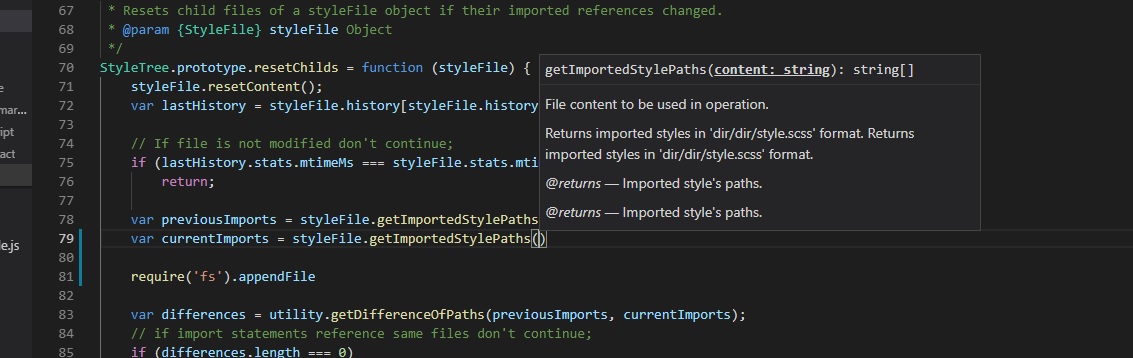
Expected. I would like to move with arrows between variations.
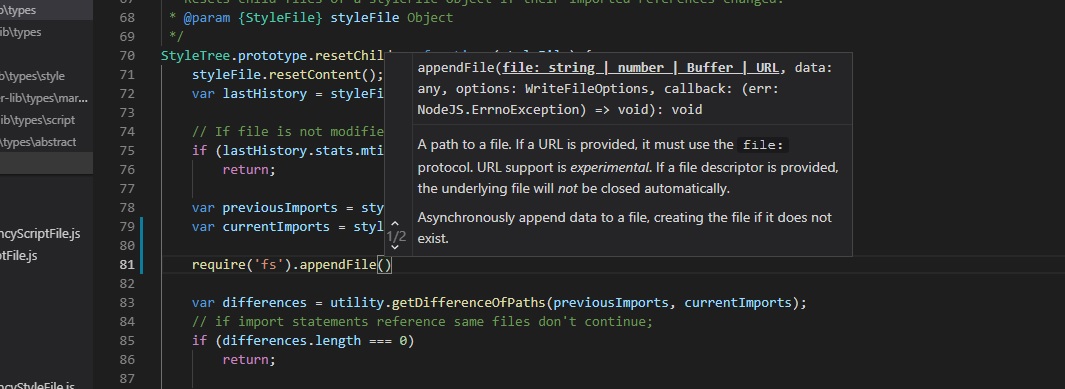
VS Code version: Code 1.33.0 (0dd516dd412d42323fc3464531b1c715d51c4c1a, 2019-04-04T15:14:28.026Z)
OS version: Windows_NT x64 10.0.17134

Issue Type: Feature Request
It would be nice to see variations of functions documented like below code, when typing the function. I documented overloaded function according to this link jsdoc/jsdoc#1017 .
Current behavior when typing.




Expected to be like below. ( Would like to see '+ overload').
And current behavior after typing
Expected. I would like to move with arrows between variations.
VS Code version: Code 1.33.0 (0dd516dd412d42323fc3464531b1c715d51c4c1a, 2019-04-04T15:14:28.026Z)
OS version: Windows_NT x64 10.0.17134