Versions
$ node --version
v8.9.4
$ yarn --version
1.5.1
$ npm --version
5.6.0
Windows 10 Professional x64
Repro steps
- Step 1: scaffold project using our company's custom template
- Step 2: run
yarn start (which starts webpack-dev-server)
- Step 3: make a change to a HTML or CSS file
- Step 4: save the file
Observed behavior
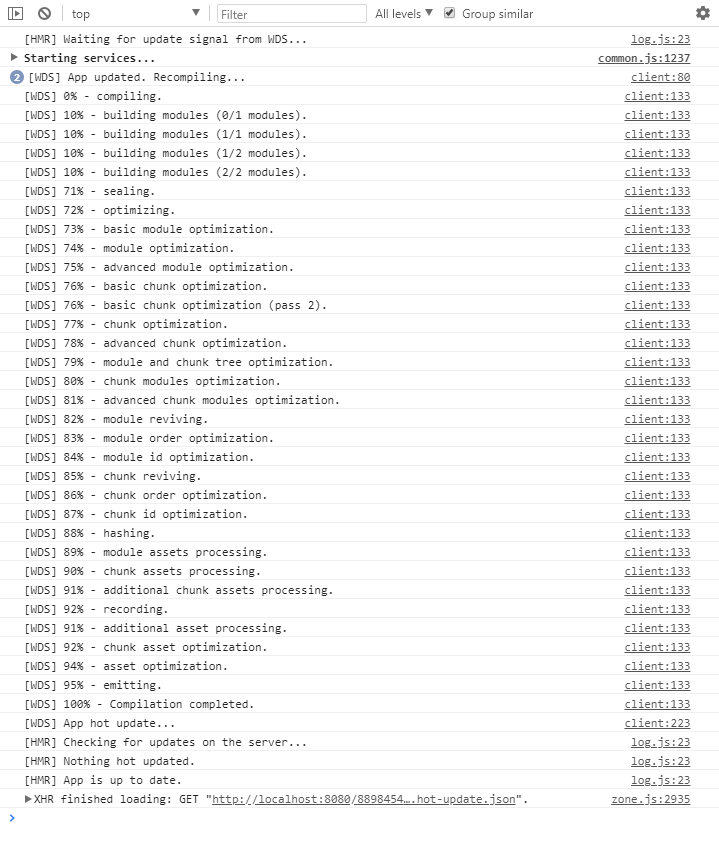
The console shows that webpack is triggering a recompile (see screenshot below), but claims "App is up to date." and does not show the changes I made.
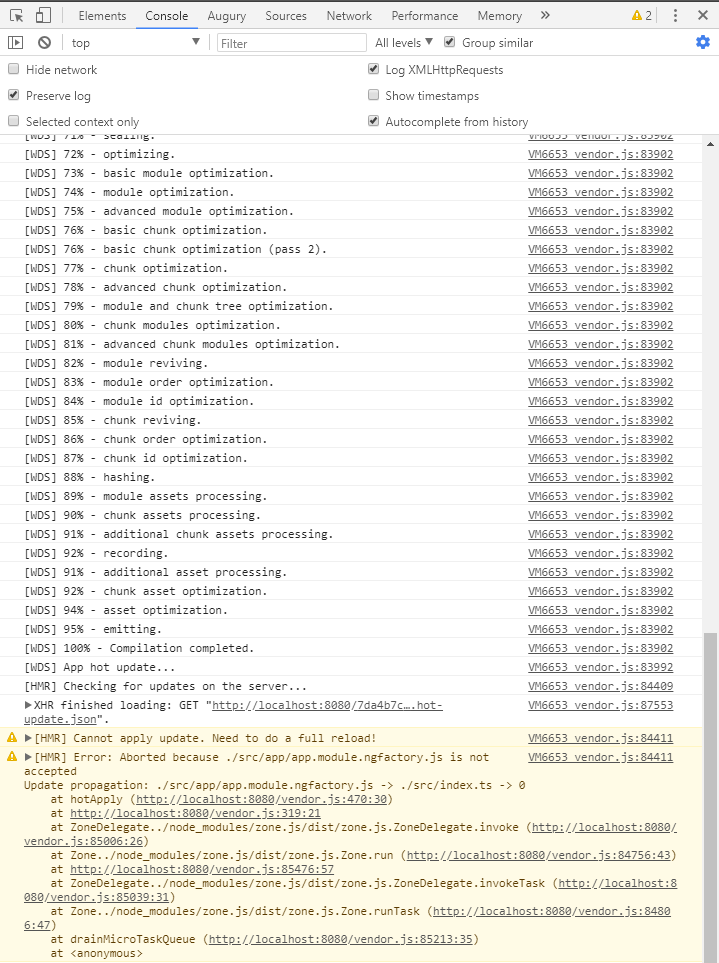
Pressing save again triggers another compilation which does a full page reload and applies the changes (see screenshot below)
Desired behavior
This behaviour prohibits me from using PHPStorm, since PHPStorm refuses to save a file that wasn't changed, and in general it's rather annoying having to press save twice to see my changes.
Mention any other details that might be useful (optional)
As mentioned, we aren't using Angular CLI, but a custom template (of which I will provide configuration files below, feel free to ask more details when needed), and the problem started occurring when we switched to AOT compilation.
I found similiar issues like #9866 and #5870
The problem is also very consistent, the first save triggers a compilation that reports nothing changed (despite running for 1-2s) and the second save will trigger a compilation that will effectively reload and show the made changes.
Generally typescript changes seem to reload instantly, but for changes to HTML and CSS I need to save twice.
Not sure if this is relevant too, but we have the HTML and CSS in separate files (as opposed to inline in the decorator).
The webpack configuration used:
const path = require('path');
const webpack = require('webpack');
const HtmlWebpackPlugin = require('html-webpack-plugin');
const ExtractTextPlugin = require('extract-text-webpack-plugin');
const AngularCompilerPlugin = require('@ngtools/webpack').AngularCompilerPlugin;

const root = path.resolve(__dirname, '..');
const sources = path.resolve(root, 'src', 'app');

module.exports = {
	entry: {
		'app': path.resolve(root, 'src', 'index.ts')
	},
	resolve: {
		extensions: ['.ts', '.js'],
		alias: {
			'WorldContainerDb': sources
		}
	},
	module: {
		rules: [
			{
				test: /\.ts$/,
				enforce: 'pre',
				loader: 'tslint-loader',
				options: {
					configFile: path.resolve(root, 'tslint.json'),
					tsConfigFile: path.resolve(root, 'tsconfig.json'),
					typeCheck: true,
				}
			},
			{
				test: /\.ts$/,
				use: '@ngtools/webpack',
			},
			{
				test: /\.html$/,
				loader: 'html-loader'
			},
			{
				test: /\.(png|jpe?g|gif|svg|woff|woff2|ttf|eot|ico)$/,
				loader: 'file-loader',
				options: {
					name: 'assets/[name].[hash].[ext]'
				}
			},
			{
				test: /\.css$/,
				include: [path.resolve(root, 'node_modules'), path.resolve(sources, 'shared', 'css')],
				loader: ExtractTextPlugin.extract('css-loader?sourceMap')
			},
			{
				test: /\.css$/,
				include: [sources],
				exclude: path.resolve(sources, 'shared', 'css'),
				loader: 'raw-loader'
			},
			{
				test: /\.json$/,
				loader: 'file-loader',
				options: {
					name: 'assets/[name].[ext]'
				}
			},
		]
	},
	plugins: [
		// Workaround for angular/angular#11580
		new webpack.ContextReplacementPlugin(
			// The (\\|\/) piece accounts for path separators in *nix and Windows
			/(.+)?angular(\\|\/)core(.+)?/,
			sources, // location of your src
			{} // a map of your routes
		),
		new webpack.optimize.CommonsChunkPlugin({
			name: 'vendor',
			minChunks: (module, count) => {
				return module.resource && (/node_modules/).test(module.resource);
			},
		}),
		new webpack.optimize.OccurrenceOrderPlugin(),
		new HtmlWebpackPlugin({
			template: 'index.html'
		}),
		new AngularCompilerPlugin({
			tsConfigPath: path.join(root, 'tsconfig.json'),
			sourceMap: true
		}),
	]
};
our Typescript configuration:
{
	"compilerOptions": {
		"target": "es5",
		"module": "commonjs",
		"moduleResolution": "node",
		"sourceMap": true,
		"strictPropertyInitialization": false,
		"emitDecoratorMetadata": true,
		"experimentalDecorators": true,
		"lib": [ "es2015", "dom" ],
		"noImplicitAny": false,
		"suppressImplicitAnyIndexErrors": true,
		"typeRoots": [ "./node_modules/@types" ],
		"types": [ "node" ],
		"baseUrl": ".",
		"outDir": "dist",
		"paths": {
            "projectName/*": [ "src/app/*" ]
		}
	},
	"angularCompilerOptions": {
		"preserveWhitespaces": false,
		"entryModule": "src/app/app.module#AppModule"
	}
}
Apologies for the long post.
I can't make a git repository for our template (since it uses internal tooling) but if required I am willing to send a zip with a generated project through mail.

Versions
Repro steps
yarn start(which starts webpack-dev-server)Observed behavior
The console shows that webpack is triggering a recompile (see screenshot below), but claims "App is up to date." and does not show the changes I made.

Pressing save again triggers another compilation which does a full page reload and applies the changes (see screenshot below)

Desired behavior
This behaviour prohibits me from using PHPStorm, since PHPStorm refuses to save a file that wasn't changed, and in general it's rather annoying having to press save twice to see my changes.
Mention any other details that might be useful (optional)
As mentioned, we aren't using Angular CLI, but a custom template (of which I will provide configuration files below, feel free to ask more details when needed), and the problem started occurring when we switched to AOT compilation.
I found similiar issues like #9866 and #5870
The problem is also very consistent, the first save triggers a compilation that reports nothing changed (despite running for 1-2s) and the second save will trigger a compilation that will effectively reload and show the made changes.
Generally typescript changes seem to reload instantly, but for changes to HTML and CSS I need to save twice.
Not sure if this is relevant too, but we have the HTML and CSS in separate files (as opposed to inline in the decorator).
The webpack configuration used:
our Typescript configuration:
{ "compilerOptions": { "target": "es5", "module": "commonjs", "moduleResolution": "node", "sourceMap": true, "strictPropertyInitialization": false, "emitDecoratorMetadata": true, "experimentalDecorators": true, "lib": [ "es2015", "dom" ], "noImplicitAny": false, "suppressImplicitAnyIndexErrors": true, "typeRoots": [ "./node_modules/@types" ], "types": [ "node" ], "baseUrl": ".", "outDir": "dist", "paths": { "projectName/*": [ "src/app/*" ] } }, "angularCompilerOptions": { "preserveWhitespaces": false, "entryModule": "src/app/app.module#AppModule" } }Apologies for the long post.
I can't make a git repository for our template (since it uses internal tooling) but if required I am willing to send a zip with a generated project through mail.