Prerequisites
Description
When performing a non-affine transform on an image using a 4x4 matrix, the perspective is incorrect.
Example is shown below, where I attempt to project a 290x154 image onto the quadrilateral with the points (52, 165), (358, 109), (115, 327), (600, 600). The two images below are not to scale with each other, but you can clearly see the issue. Both images were generated using the same matrix, but the first one was done using CSS and matrix3d() while the second one was done using ImageSharp and IImageProcessingContext<Rgba32>.Transform.
Expected output:
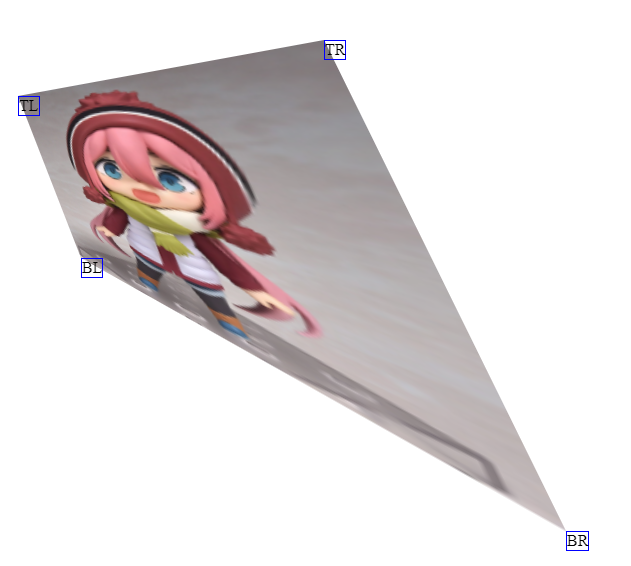
Actual output:

Steps to Reproduce
The below code is for 1.0.0-beta0005, but for the dev builds I just replaced the ctx.Transform call with ctx.Transform(new ProjectiveTransformBuilder().AppendMatrix(m1), KnownResamplers.Lanczos3); and ran into the same issue.
var img = Image.Load<Rgba32>("test.png");
img.Mutate(ctx => { ctx.Resize(290, 154); });
var canvas = new Image<Rgba32>(600, 600);

// Same as the matrix3d() used in https://jsfiddle.net/dFrHS/545/
var m1 = new Matrix4x4(0.260987f, -0.434909f, 0, -0.0022184f, 0.373196f, 0.949882f, 0, -0.000312129f, 0, 0, 1, 0, 52, 165, 0, 1);

canvas.Mutate(ctx =>
{
    ctx.DrawImage(img, 1);
    ctx.Transform(m1, KnownResamplers.Lanczos3);
});
canvas.Save("canvas.png");
The expected output image was generated using https://jsfiddle.net/dFrHS/545/ (from this SO answer).
System Configuration
- ImageSharp version: 1.0.0-beta0005, 1.0.0-dev002237
- Environment (Operating system, version and so on): Windows 10 Pro x64 version 1803, Ubuntu Server x64 18.04.1 LTS with Docker
- .NET Framework version: .NET Core 2.2
- Additional information:

Prerequisites
DEBUGandRELEASEmodeDescription
When performing a non-affine transform on an image using a 4x4 matrix, the perspective is incorrect.
Example is shown below, where I attempt to project a 290x154 image onto the quadrilateral with the points (52, 165), (358, 109), (115, 327), (600, 600). The two images below are not to scale with each other, but you can clearly see the issue. Both images were generated using the same matrix, but the first one was done using CSS and
matrix3d()while the second one was done using ImageSharp andIImageProcessingContext<Rgba32>.Transform.Expected output:


Actual output:
Steps to Reproduce
The below code is for 1.0.0-beta0005, but for the dev builds I just replaced the
ctx.Transformcall withctx.Transform(new ProjectiveTransformBuilder().AppendMatrix(m1), KnownResamplers.Lanczos3);and ran into the same issue.The expected output image was generated using https://jsfiddle.net/dFrHS/545/ (from this SO answer).
System Configuration